

Free Download Siemens DesignCenter NX 2512.4001 (NX 2512 Series) | 18.8 Gb
Languages Supported: English, 中文, Čeština, Español, Français, Deutsch,
Italiano, 日本語, 한국어, Polski, Português, Русский
Siemens Digital Industries Software has released Designcenter NX 2512.4001 (NX 2512 Series) is software solution developed to enhance digital engineering and collaboration throughout the lifecycle of your engineering projects.
The latest release of Designcenter NX isn't an incremental update; it's a strategic investment in digital transformation. This update introduces significant enhancements in AI-driven automation, web editing, immersive engineering, and enhanced collaboration tools for both design and manufacturing workflows.
What's new in Designcenter NX 2512.4001
Export URDF
Use the Export URDF command to export a mechanically valid, simulation-ready unified robotics description format (URDF) model for a chain of joints. You can use the data to test motion and model behavior with external software solutions with robotic simulations and control tooling. You can select a base rigid body to identify an open chain of joints then export the associated joint and rigid-body data. The exported data is formatted such that an attachment is defined as a child of a base object.
You can export data for the following object types:
- Fixed
- Hinge
- Sliding
- Position Control
- Speed Control
Use the Export URDF command to support comprehensive simulations with rigid-body data related to facet bodies, sheet bodies, solid bodies, or components, including:
- Effort
- Inertia
- Lower
- Mass
- Orientation
- Position
- Upper
- Velocity
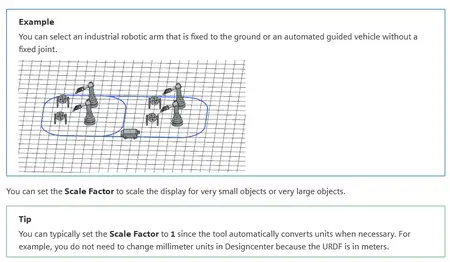
By default, the data is automatically calculated. You can use the Assign Material command to update data for the rigid body, mass, and inertia. You can select a base rigid body with or without a joint fixing the chain to the ground.
Why should I use it?
Export MCD data in URDF and STL files to a user-defined location so that you can test model physics in external software environments.
Designcenter is the new name for Siemens' portfolio of mechanical design software. It goes beyond branding-the new moniker comes with increasing interoperability and "aggressive" new pricing that Siemens believes will serve everyone from a single-person design startup to a major enterprise OEM. Siemens NX and Siemens Solid Edge aren't going anywhere-yet. Both products exist as part of the Designcenter portfolio. Siemens hasn't announced any specific plans to phase out those brands, but most likely at some point, Designcenter will be the name of Siemens' CAD software.
Designcenter NXis a powerful software suite used for product design, engineering, and manufacturing. As technology evolves, various versions of Siemens NX, including the latest NX version, have been released, each with improved features and capabilities. Understanding the key versions of Siemens NX is crucial for professionals in design and engineering fields. The major releases typically include significant enhancements that improve usability and performance. Each NX version is designed to enhance user experience and streamline workflows, making it vital for professionals to stay updated on the latest features and improvements introduced in each NX version. Understanding the capabilities of each NX version allows users to fully leverage the software's potential in their design and engineering tasks. For those seeking to improve their understanding of the software, reviewing the unique characteristics of each NX version can be invaluable. This knowledge empowers users to select the most appropriate NX version for their specific projects and tasks.
What's New in NX 2512 - Axial Layout
Brand new in Designcenter NX 2512 there is now an Axial Pattern Layout option in the Pattern commands! This will enable the quick creation of cylindrical or conical patterns for your designs, and can be measured within the tool either along the Angle or along the Axis for an easily detailed pattern.
Siemens Digital Industries Softwareis a global leader in the growing field of product lifecycle management (PLM), manufacturing operations management (MOM), and electronic design automation (EDA) software, hardware, and services.
Owner:Siemens Digital Industries Software
Product Name:Designcenter NX
Version:NX 2512.4001 (NX 2512 Series)
Supported Architectures:x64
Website Home Page :
Languages Supported:multilanguage
System Requirements:Windows *
Size:18.8 Gb

Export URDF
Use the Export URDF command to export a mechanically valid, simulation-ready unified robotics description format (URDF) model for a chain of joints. You can use the data to test motion and model behavior with external software solutions with robotic simulations and control tooling. You can select a base rigid body to identify an open chain of joints then export the associated joint and rigid-body data. The exported data is formatted such that an attachment is defined as a child of a base object.
You can export data for the following object types:
- Fixed
- Hinge
- Sliding
- Position Control
- Speed Control
Use the Export URDF command to support comprehensive simulations with rigid-body data related to facet bodies, sheet bodies, solid bodies, or components, including:
- Effort
- Inertia
- Lower
- Mass
- Orientation
- Position
- Upper
- Velocity
By default, the data is automatically calculated. You can use the Assign Material command to update data for the rigid body, mass, and inertia. You can select a base rigid body with or without a joint fixing the chain to the ground.
Why should I use it?
Export MCD data in URDF and STL files to a user-defined location so that you can test model physics in external software environments.
Code:
http://peeplink.in/50f079758693Designcenter is the new name for Siemens' portfolio of mechanical design software. It goes beyond branding-the new moniker comes with increasing interoperability and "aggressive" new pricing that Siemens believes will serve everyone from a single-person design startup to a major enterprise OEM. Siemens NX and Siemens Solid Edge aren't going anywhere-yet. Both products exist as part of the Designcenter portfolio. Siemens hasn't announced any specific plans to phase out those brands, but most likely at some point, Designcenter will be the name of Siemens' CAD software.
Designcenter NXis a powerful software suite used for product design, engineering, and manufacturing. As technology evolves, various versions of Siemens NX, including the latest NX version, have been released, each with improved features and capabilities. Understanding the key versions of Siemens NX is crucial for professionals in design and engineering fields. The major releases typically include significant enhancements that improve usability and performance. Each NX version is designed to enhance user experience and streamline workflows, making it vital for professionals to stay updated on the latest features and improvements introduced in each NX version. Understanding the capabilities of each NX version allows users to fully leverage the software's potential in their design and engineering tasks. For those seeking to improve their understanding of the software, reviewing the unique characteristics of each NX version can be invaluable. This knowledge empowers users to select the most appropriate NX version for their specific projects and tasks.
What's New in NX 2512 - Axial Layout
Brand new in Designcenter NX 2512 there is now an Axial Pattern Layout option in the Pattern commands! This will enable the quick creation of cylindrical or conical patterns for your designs, and can be measured within the tool either along the Angle or along the Axis for an easily detailed pattern.
Siemens Digital Industries Softwareis a global leader in the growing field of product lifecycle management (PLM), manufacturing operations management (MOM), and electronic design automation (EDA) software, hardware, and services.
Owner:Siemens Digital Industries Software
Product Name:Designcenter NX
Version:NX 2512.4001 (NX 2512 Series)
Supported Architectures:x64
Website Home Page :
Code:
www.plm.automation.siemens.comSystem Requirements:Windows *
Size:18.8 Gb
Recommend Download Link Hight Speed | Please Say Thanks Keep Topic Live
Rapidgator-->Click Link PeepLink Below Here Contains Rapidgator
SiemensDesignCenterNX25124001NX2512SeriesFreeDownload.html
http://peeplink.in/6d79c4aca62d
DDownload
53ges.Siemens-DesignCenter-NX-2512-4001-NX-2512-Series-Free-Download.part1.rar
53ges.Siemens-DesignCenter-NX-2512-4001-NX-2512-Series-Free-Download.part2.rar
53ges.Siemens-DesignCenter-NX-2512-4001-NX-2512-Series-Free-Download.part3.rar
53ges.Siemens-DesignCenter-NX-2512-4001-NX-2512-Series-Free-Download.part4.rar
53ges.Siemens-DesignCenter-NX-2512-4001-NX-2512-Series-Free-Download.part5.rar
FreeDL
53ges.Siemens-DesignCenter-NX-2512-4001-NX-2512-Series-Free-Download.part1.rar.html
53ges.Siemens-DesignCenter-NX-2512-4001-NX-2512-Series-Free-Download.part2.rar.html
53ges.Siemens-DesignCenter-NX-2512-4001-NX-2512-Series-Free-Download.part3.rar.html
53ges.Siemens-DesignCenter-NX-2512-4001-NX-2512-Series-Free-Download.part4.rar.html
53ges.Siemens-DesignCenter-NX-2512-4001-NX-2512-Series-Free-Download.part5.rar.html
Links are Interchangeable - No Password - Single Extraction