

Free Download Power Path 25.2 (08) | 994.2 mb
POWER PATH DOO has released Power Path 25.2 is standalone CAD and BIM software solution, which offers comprehensive tools for designing transmission and distribution lines, while also supporting data exchange with other CAD and BIM platforms.
Power Path 25 introduces beam properties, IFC exporting/importing, model exchange, expanded support library, 3D preview, and a refined user interface.
What's new in Power Path 25.2
Upgraded or/and extended existing commands and functionalities for power line design
-Add Weather Conditions and Edit Weather Conditions
When the user defines a positive value for the user-defined temperature, the input options for ice load is automatically disabled, meaning their values are considered to be 0. When a negative value is defined, the user is given the option to input and define the ice load.

With this upgrade, the chance of defining incorrect conditions when creating the weather conditions definition is reduced.
-Create Sag Tension Report
The report now includes the length of the conductor for each temperature listed, so in addition to sag and tension, the report also contains conductor lengths at different temperatures.

With this upgrade, in addition to the 3D graphical display that already existed, a numerical value of the catenary length for different temperatures is now available.
-Create Quantity Report
The report now includes the length of the conductor, so in addition to other quantities, it also shows values representing conductor lengths.
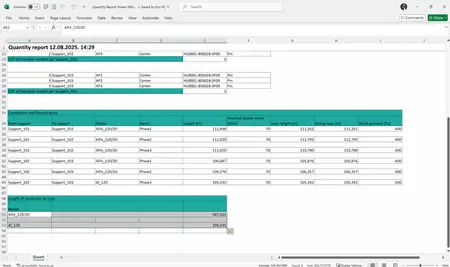
With this upgrade, this report provides information for lengths of all used conductors for selected power line.
-Create Support Report
The report now includes calculations of reduced forces and moments at the top of the support, so in addition to load components, it also contains the resultant force and moment values.
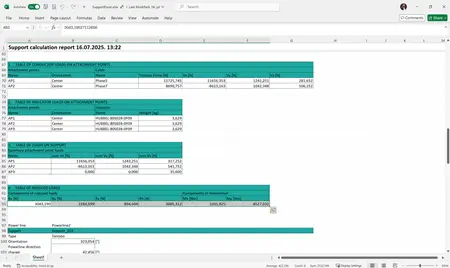
With this upgrade, the report provides information on summarized loads on the support.
-Settings
Units for moment have been added to the settings.
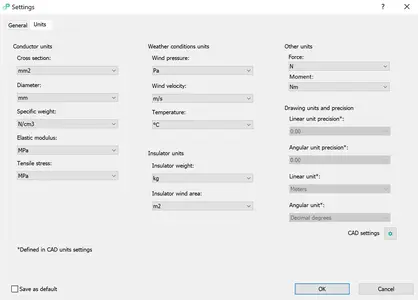
The added setting for unit moment (in Other units) allows users to choose the desired unit for the generated results in reports.
-Create Sag Tension Report
When generating the Sag - Tension report under previously defined weather conditions without ice load, the report will now be created with correct critical span values and will no longer display the value "infinite".

Close
The issue has been fixed in this version.
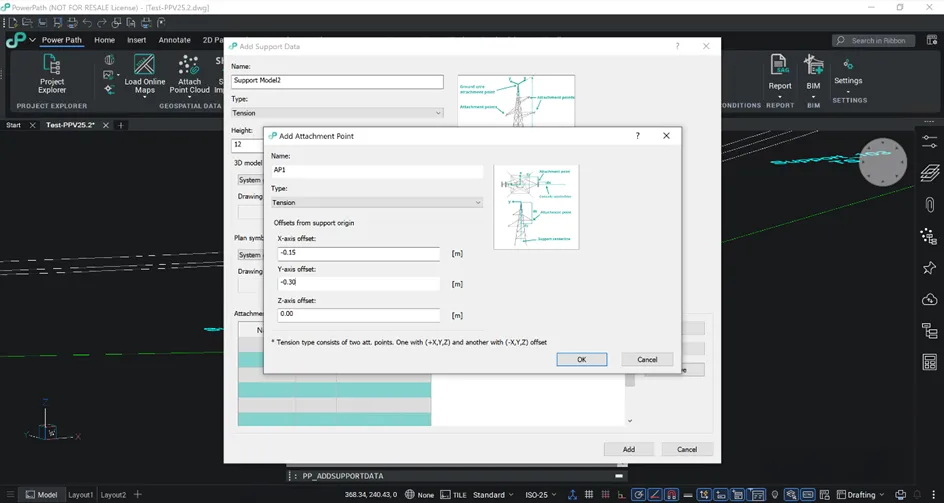
-Add Support Data
A fix has been implemented regarding the ability to add attachment points when adding new supports.
Close
The issue has been fixed in this version.
-Panels Layers and Attachments
Panels Layers and Attachments can be enabled on the docked sides (left or right).


Close
These issues have been fixed in this version.
Power Pathis software solution for designing power lines and creation of digital twin according to the VDC process that supports BIM methodology. Power Path solution is not just limited on power line design process, it is a powerful CAD and BIM solution for 2D drafting and 3D BIM modeling in AEC (Architecture, Engineering and Construction) industry.
What is new in the software solution Power Path V25?
POWER PATH DOOis a company established with the main purpose to ensure faster workflow and automation for the next generation of democratized solutions in the energy and construction industry. Developing software solution for designing power lines and creation of digital twin according to the VDC (Virtual Design & Construction) process is currently our main business. With our software solution Power Path we want to solve the problem of manual or semi-manual work in designing process of power lines by introducing BIM (Building Information Modeling) approach.
Owner:POWER PATH DOO
Product Name:Power Path *
Version:25.2 (08)
Supported Architectures:x64
Website Home Page :
Languages Supported:english
System Requirements:Windows **
Size:994.2 mb
*Power Path is standalone (Windows) solution, independent of other platforms. Solution is developed on Bricsys BricsCAD platform like BricsCAD Solution Build model (BSB).

What's new in Power Path 25.2
Upgraded or/and extended existing commands and functionalities for power line design
-Add Weather Conditions and Edit Weather Conditions
When the user defines a positive value for the user-defined temperature, the input options for ice load is automatically disabled, meaning their values are considered to be 0. When a negative value is defined, the user is given the option to input and define the ice load.
With this upgrade, the chance of defining incorrect conditions when creating the weather conditions definition is reduced.
-Create Sag Tension Report
The report now includes the length of the conductor for each temperature listed, so in addition to sag and tension, the report also contains conductor lengths at different temperatures.
With this upgrade, in addition to the 3D graphical display that already existed, a numerical value of the catenary length for different temperatures is now available.
-Create Quantity Report
The report now includes the length of the conductor, so in addition to other quantities, it also shows values representing conductor lengths.
With this upgrade, this report provides information for lengths of all used conductors for selected power line.
-Create Support Report
The report now includes calculations of reduced forces and moments at the top of the support, so in addition to load components, it also contains the resultant force and moment values.
With this upgrade, the report provides information on summarized loads on the support.
-Settings
Units for moment have been added to the settings.
The added setting for unit moment (in Other units) allows users to choose the desired unit for the generated results in reports.
-Create Sag Tension Report
When generating the Sag - Tension report under previously defined weather conditions without ice load, the report will now be created with correct critical span values and will no longer display the value "infinite".
Close
The issue has been fixed in this version.
-Add Support Data
A fix has been implemented regarding the ability to add attachment points when adding new supports.
Close
The issue has been fixed in this version.
-Panels Layers and Attachments
Panels Layers and Attachments can be enabled on the docked sides (left or right).
Close
These issues have been fixed in this version.
Power Pathis software solution for designing power lines and creation of digital twin according to the VDC process that supports BIM methodology. Power Path solution is not just limited on power line design process, it is a powerful CAD and BIM solution for 2D drafting and 3D BIM modeling in AEC (Architecture, Engineering and Construction) industry.
What is new in the software solution Power Path V25?
POWER PATH DOOis a company established with the main purpose to ensure faster workflow and automation for the next generation of democratized solutions in the energy and construction industry. Developing software solution for designing power lines and creation of digital twin according to the VDC (Virtual Design & Construction) process is currently our main business. With our software solution Power Path we want to solve the problem of manual or semi-manual work in designing process of power lines by introducing BIM (Building Information Modeling) approach.
Owner:POWER PATH DOO
Product Name:Power Path *
Version:25.2 (08)
Supported Architectures:x64
Website Home Page :
Code:
https://power-path.com/System Requirements:Windows **
Size:994.2 mb
*Power Path is standalone (Windows) solution, independent of other platforms. Solution is developed on Bricsys BricsCAD platform like BricsCAD Solution Build model (BSB).
Recommend Download Link Hight Speed | Please Say Thanks Keep Topic Live
Rapidgator
vn1m4.Power.Path.25.2.08.rar.html
DDownload
vn1m4.Power.Path.25.2.08.rar
FreeDL
vn1m4.Power.Path.25.2.08.rar.html
Links are Interchangeable - No Password - Single Extraction